The Session Is the Artifact
The JSONL session file is the primary deliverable, not the resulting code. Replayable, line-addressable, auditable — 11.6 GB across 538 directories of permanent record telling you exactly how every commit got written.
View companion repoI ran du -sh ~/.claude/projects/ and got a number that surprised me: 11.6 GB. Five hundred thirty-eight directories. Twenty-three thousand four hundred seventy-nine session files. Every conversation I've had with Claude Code, line by line, in JSONL format, sitting on disk going back almost two years.
For a long time I thought of those files as logs. Throwaway artifacts of work that happened. The real output was the code that got committed, the features that shipped, the bugs that got fixed. The JSONL was just a side-effect.
That framing was wrong. The JSONL is the artifact. The code is the side-effect.
What's Actually in a Session File
Each session is a single JSONL file at ~/.claude/projects/<encoded-project-path>/<session-id>.jsonl. One JSON object per line, append-only, written turn-by-turn during the session (Claude Code: Work with sessions). The schema is stable across versions:
Five top-level types: summary (one per session, written at start), user (every user message), assistant (every model response), tool_use (each tool call, embedded in assistant content arrays), tool_result (each tool's return, embedded in user content arrays as continuation) (reverse-engineered schema reference, anthropics/claude-code#53516).
Every line is timestamped to the millisecond. Every tool call records its parameters. Every tool result records what the tool returned. Every assistant message records its usage metadata — input tokens, cache hits, cache creates, output tokens, model identifier (Anthropic prompt caching docs).
That's enough to fully reconstruct the session. Not just what got produced — what got tried, what got rolled back, what the model considered before settling on the final answer. The JSONL contains every turn the agent took, including the ones that led nowhere.
Why That Matters
A git log tells you what got committed. A session JSONL tells you why. The git history shows the final state of every file. The session log shows the dialogue that produced it — every consideration, every alternative, every rejected approach.
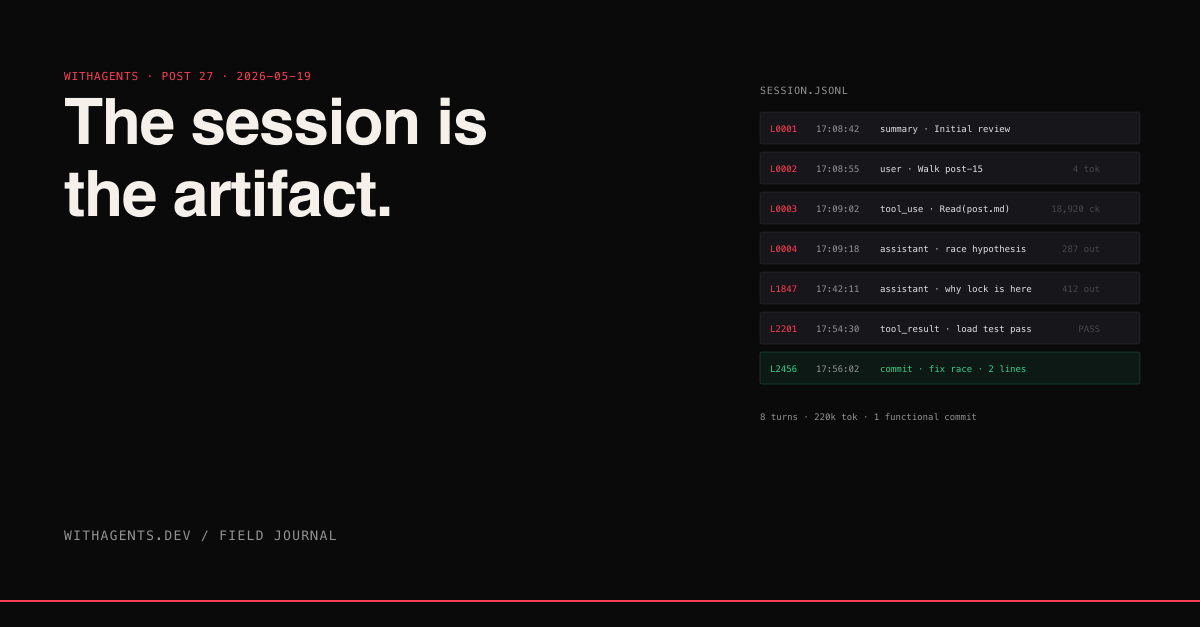
I had a bug last month that took eight turns of debugging to track down. The fix in git is two lines changed. Looking at the diff alone, you'd think this was a trivial change. The session log showed the actual work: turn 1 reading the failing test, turn 2 reading the implementation, turns 3-5 forming and rejecting hypotheses, turn 6 finding the actual cause (a race condition in cleanup), turns 7-8 implementing and validating the fix. Eight turns, 220k tokens, one functional commit.
Six months from now when someone asks "why is this lock here?" the git history won't help. The session log will. Line 1,847 contains the assistant's explanation of why the race exists. Line 2,201 contains the user's verification that the fix passed under load. The commit message says "fix race in cleanup." The session log says everything.
Line-Addressable Forensics
Because each turn is one line, the JSONL is line-addressable. You can grep, you can sed -n '450,480p', you can pipe through jq and filter by tool name (JSON Lines specification). The whole Unix toolchain works on session logs out of the box.
Three queries I run constantly. Find every Bash command run in a project this month:
That returns every shell command the agent has run in this project this month. Useful for "did I already try X?" questions. Useful for security audits.
Find sessions where a specific file was edited:
One regex pass. Tells you every session that touched a given file. Combined with the timestamps in each match, you get a chronological history of who/when/why a file changed across all your work, beyond what git log -p shows.
Replay-Driven Debugging
The session is replayable. Not "you can re-run the agent and hope for the same outcome" — actually replayable, in the sense that you can take the JSONL, re-feed it to a model, and watch the agent's thinking unfold turn by turn (Claude Code resumes sessions by parsing JSONL line-by-line and rebuilding the message array — Work with sessions).
Twenty-five lines. Print every turn of any session as a human-readable transcript. Combined with until_turn, you can replay up to a specific point and inspect what the agent saw before making a decision. That's invaluable for "why did the agent do X" debugging.
Cross-Session Search Across the Corpus
The really powerful pattern is searching across the whole corpus. I have 23,479 sessions. Some of them solve the same problems I'm currently working on. Finding the relevant ones is a search problem.
I wrote a basic indexer that walks the JSONL files, extracts user messages and tool calls, and indexes them. Now I can run queries like "show me every session where I worked on rate limiting" or "find sessions where I debugged a Supabase query" and get a list of session IDs sorted by relevance.
That's not novel. What's novel is what you can do with the results. A session ID lets you reload the entire conversation as context for a new session. The agent picks up where past-me left off, with full visibility into the failed approaches I already tried, the constraints I already discovered, the working solution I eventually landed on.
Past sessions become an institutional memory the current session can consult. Not just "what did I do" — "how did I think about it, what almost worked, what failed."
The 538 Directories
The directory structure under ~/.claude/projects/ encodes the project path. -Users-nick-Desktop-blog-series is the project at /Users/nick/Desktop/blog-series. The directory contains every session I've run in that project, ever. There's no rotation, no cleanup, no compression by default (Yi Huang, *Inside Claude Code: The Session File Format*).
That's why my disk usage hit 11.6 GB. Twenty-three thousand sessions across 538 projects accumulate. Some of those projects are dead — I haven't touched them in a year. Their session directories still sit there, intact, ready to be reloaded if I ever come back.
I treat the directory itself as a project artifact. When I clone a repo to a new machine, the first thing I do is pull the matching session directory from my backup. It's free institutional knowledge. The new machine has the same conversational history I built on the old one. Continuity across hardware moves.
Backing It Up
Two things I do that I'd recommend to anyone treating sessions as artifacts:
- 01Encrypt and back up ~/.claude/projects/. It's source-of-truth for an enormous amount of context. Losing it is like losing a journal you've been keeping for years. The discipline-hooks I described in the secrets post mean the contents are scrubbed of sensitive material, so encrypted backup is sufficient — no need for selective archival.
- 02Periodically index the corpus. Whatever search/retrieval tool you use, run it across the full corpus monthly. The compounding return is huge. As the corpus grows, more questions can be answered by past sessions, and you stop redoing work you've already done.
The session-insight-miner I built does both. It walks ~/.claude/projects/, indexes every session, and produces queryable artifacts. Run it on your own corpus and the picture clarifies fast — most of your work has been done before, by you, and the answers are already on disk.
What This Changes About How I Work
I stopped treating sessions as ephemeral. I name them when starting if they're going to do significant work, so the summary line is meaningful. I write final summaries before ending a long session, so the artifact is self-describing. I treat the JSONL like a codebase: searchable, replayable, addressable.
That changes the value of the work. A session that fails to ship code can still produce a useful artifact — the failure trace itself. A session that explores a question and lands on "the answer is no" is still valuable, because the next time someone asks that question, I have the reasoning ready. Sessions become library cards, not garbage. Eleven gigabytes of past work, organized, labeled, ready to be consulted when current-me is stuck on something past-me already figured out.
“The artifact is the JSONL. The code is the side-effect.”
Continue the series
- 26Edge CasesGiving Agents Secrets Without Giving Agents SecretsThe pattern: secrets enter the agent's environment at the tool boundary, not in the prompt. Vault-injected env. 1Password op-run envelopes. Hooks that scrub before write. Your session JSONL gets archived; nothing in there should be sensitive.
- 28Edge CasesThe AI-Pattern Detector That Ships This SeriesSix banned phrases, three syntactic patterns, one cosine-similarity fingerprint, and a humanize loop that rewrites flagged passages until the voice matches. The gate every post in this series passes through.
- 29Edge CasesThe Skill Marketplace ProblemSeventy-one marketplaces subscribed. One hundred thirty-two plugins installed. Twenty-six marketplaces installed-but-unused. The discovery overhead is the bottleneck — and it's getting worse.
- 30Edge CasesNotification Architecture for Async AgentsAgents finish at three in the morning. Severity model, channel routing, the exhausted-state-fires-alert pattern. The notification layer that lets you sleep while your work runs.